case · ~2007
PearPC VirtualBox GUI.
Role
Solo, teenager
Stack
- Visual Basic 6
- ClickTeam Install Creator
- bunnies-in-cat-onesies icon pack
PearPC VirtualBox GUI
A VirtualBox-style front end for the PearPC PowerPC emulator, written in VB6 at 17 because I wanted to run Mac OS X and couldn't afford a Mac. It silently became the standard way to launch PearPC for years, got mirrored to CNET and Softpedia, inspired a 2018 ground-up rewrite in .NET, and probably helped me get my first proper job.
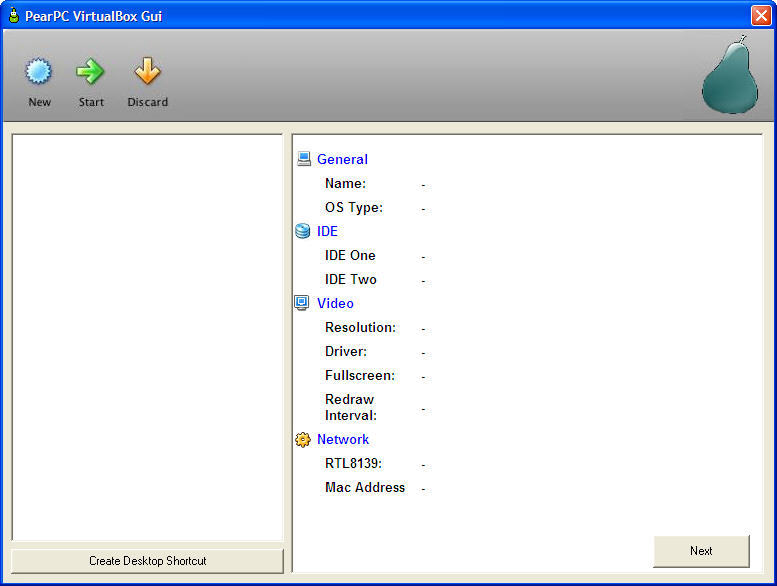
TL;DR
The year: around 2007. Pre-hackintosh, post-Intel-transition. PearPC was the way to run PowerPC Mac OS X on a Windows box, and it asked you to hand-write a config file and launch it from a command line.
The itch: I loved Macs, couldn't afford one, and thought emulating one should be less of a faff.
The build: VB6, a wizard, a VM list, a detail pane. VirtualBox had just made the "click to create a VM" shape feel obvious, and PearPC was begging for it. A weekend-ish thing that ended up quietly mattering to a whole emulator community.
The problem
PearPC in 2007 was a brilliant and unfriendly piece of software. To boot a PowerPC Mac OS X install you needed to:
- Write a config file by hand with dozens of options, RAM, CPU flags, disk image paths, CD/ISO, resolution, MAC address, network bridge.
- Know the PearPC command-line incantation.
- Re-do all of that for every "machine" you wanted to maintain separately.
There was no persistence, no list of saved VMs, no "click to boot". If you wanted to try a second install, you copied your config file somewhere else and edited it.
This was exactly the sort of job VirtualBox had recently made obvious the shape of: a list of VMs, a detail pane, a New Machine wizard, a big green Start button.
The tool
A straight lift of the VirtualBox UI pattern, applied to PearPC:
- Left pane: list of saved "machines".
- Right pane: detail view for the selected machine, RAM, disk, CD/ISO, resolution, MAC address, CPU flags.
- New Machine wizard: step-through form that generated a valid PearPC config file from defaults, so a first-time user could boot something without reading the PearPC docs.
- Boot button: shelled out to
pearpc.exewith the right args. - Desktop shortcut: generated a
.lnkthat pointed atpearpc.exewith the machine's config, so power users could skip the GUI once a machine was set up.
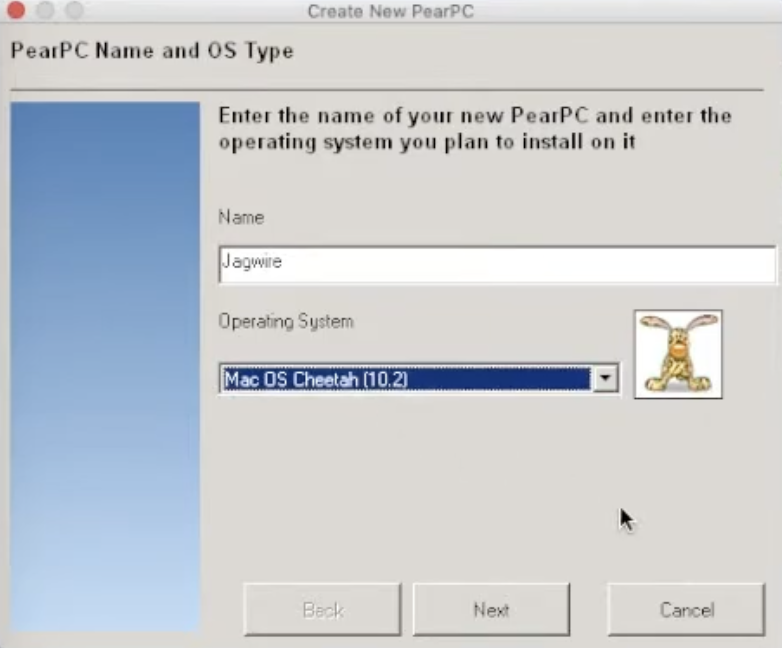
Icons
The icons were a pack by Julia Nikolaeva: bunnies in cat onesies. Mac OS X releases at the time were named after big cats, Jaguar, Panther, Tiger, Leopard, and the pack gave me a pre-drawn little bunny for each one. They had no business being as on-brand as they were. They're credited in the 2018 remake.
Stack
Pure Visual Basic 6, which at 17 I had about nine years of experience in. VB6 did the job well:
- The MDI-ish main window and wizard forms were drag-and-drop.
- Shelling out to PearPC and writing its config file was half a dozen lines of file I/O.
- Creating desktop shortcuts used the Windows Scripting Host COM object (
WScript.Shell.CreateShortcut), which was the standard trick for this in 2007.
Nothing in here was technically ambitious. It was a thin, opinionated wrapper around a power-user tool, and that was the whole point.
Release and reach
I put the installer on my dad's hosting (kxlan.co.uk) and posted a link on a forum. That was the entire marketing plan.
Over the next couple of years it quietly propagated:
- Mirrored by CNET Download.com, Softpedia, and the usual constellation of Windows freeware aggregators.
- Referenced as the tool to use on Emaculation (the main Mac-emulation community at the time), which is how I know it became the default, I'd Google it every few years out of curiosity and find it still being recommended.
- YouTube tutorials from strangers showing people how to run PowerPC Mac OS with it.
- A 2018 ground-up remake, PearBox GUI, by SistemaRayoXP, rebuilt in .NET 2.0 from scratch (not decompiled), with the Julia Nikolaeva icon pack and my name in the credits.
I never saw any download numbers. I just watched strangers re-explain my tool to other strangers for a decade.
It was also, I'm fairly sure, the single most impressive thing on my CV when I got my first proper software job. "I wrote a tool used by a community I wasn't part of" reads very differently from any coursework project.
The ClickTeam footnote
I bundled the installer with ClickTeam Install Creator, a perfectly normal Windows installer authoring tool of the era.
ClickTeam's installer stubs were, across the 2000s and 2010s, chronic false-positive magnets for Windows Defender and other AV vendors. The way they self-extracted looked enough like a malware pattern to get flagged.
I only found out about this years later, lurking on forum threads where people debated whether the GUI was safe. By then the binary was long out of my hands and long out of date. The 2018 remake hit the same trap: its v3.0 also got flagged by Windows Defender, though in that case because of a bundled 6GB disk image.
Ironically, the fact that both the original and the remake got pinged is a quite tidy lesson in "the legacy of a freeware tool is partly outside the code", it's also the installer, the AV landscape, and the hosting.
What I'd tell the teenager who built this
- Shipping into a small niche beats shipping nothing. A tool that mattered to a few thousand PowerPC Mac nerds is worth more on a CV, and in my head, than a dozen polished personal projects nobody used.
- VirtualBox's UI was the real insight. The engineering was trivial. The architectural choice, "steal the shape of the tool next door", was the whole contribution.
- Sign your installer, even if nobody is asking you to. Every modern Windows app has this problem too; it just costs money now.
Links
- 2018 remake thread (PearBox GUI): emaculation.com, SistemaRayoXP
- A random YouTube video using the tool: youtu.be/v7bmmvpf-hM
- Source: lost. The binary and icons survive on mirror sites; no copy of the VB6 project file does, as far as I know.
next case →
Ramalley Pre-School
The first website I was paid to build. I was 15. My mum was the client. Comic Sans was a design decision. It's here on the portfolio as a reminder of where this started.